Most photo attractions end on a phone screen. A newspaper style photo booth ends in the guest’s hand. The difference sounds small, and it is not. A phone photo is seen once and buried in a camera roll, while a printed sheet goes home, sits on a desk, gets pinned to a fridge, and is photographed again by everyone who visits. Because the print carries your venue’s identity, it keeps working long after the session is paid for. This guide explains how the format earns, where the shallow cabinet fits, and which print details to confirm before ordering. You can review the full machine here: https://www.bleearcade.com/product/blee-mini-newspaper-photo-booth-machine-for-malls-and-events/
Why the Printed Souvenir Matters More Than the Photo
A digital photo booth sells an image. A newspaper style photo booth sells an object.
That object has three properties a digital file does not.
First, it is visible to people who were not there. A print on a desk is seen by colleagues, flatmates, and family, so one paid session produces several impressions of your brand.
Next, it is durable. A print survives the phone upgrade, the account deletion, and the lost password.
Then, it is a reason to return. Groups often print one sheet for the person whose occasion it is, and the rest of the group come back to make their own.
Therefore, the print is not a consumable cost to be minimised. It is the marketing asset the machine produces.
The Cabinet as a Brand Carrier
Because the print leaves the building, everything printed on it is advertising.
That changes what to ask before buying. Ask what the print template allows: whether a venue logo can sit on the sheet, whether a headline can be edited per event, and whether a QR code or a social handle can be added. Ask, too, whether templates differ between units, because a headline that cannot be changed limits the machine to one occasion.
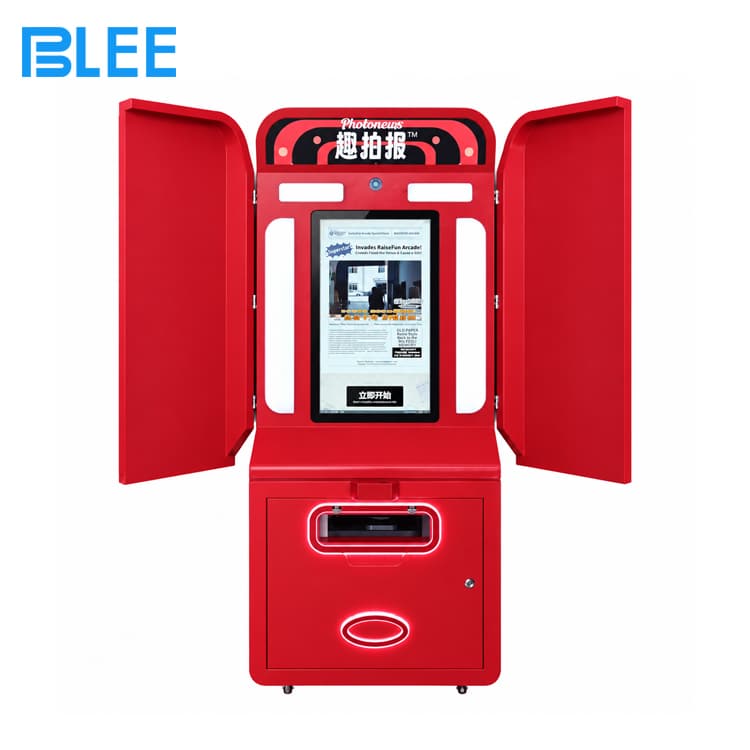
The cabinet itself carries the same job from the other direction. The red exterior is unusual on a floor of black cabinets, and the illuminated details make the unit readable from a distance. Therefore, the machine advertises the attraction and then produces an advertisement.
Side Panels and the Booth Effect
The machine has two red side panels near the upper front area.
They do a specific job. A photo attraction without side definition reads as a screen on a wall, and guests are unsure where to stand. The panels frame the space, so the guest understands the boundary of the shot. In addition, they match the cabinet finish, which keeps the unit reading as one object rather than a screen plus a frame.
For an operator, that means the panels are a placement constraint as much as a design feature. Do not back the unit into a corner where one panel is pressed against a wall, because the framing effect disappears.
The Output Slot and the Consumables Question
A horizontal output opening sits below the display, with an illuminated border.
The page does not state the printing format, the paper size, or the output specifications, so treat those as open items. However, the commercial question behind them is straightforward: what does one print cost, and how quickly can it be produced?
Therefore, ask four things about consumables before you commit to a newspaper style photo booth.
First, the cost per print, including paper and any ink or ribbon.
Next, the source and lead time for that consumable, because a machine that cannot be restocked stops earning.
Then, the print time per sheet, because it sets the queue length at peak hours.
Finally, the failure mode. Ask what happens when paper jams mid-session, and whether the guest is refunded automatically or by staff.
What to Confirm Before Ordering
The printing format, paper size, and output specifications were explicitly not provided. Camera and lighting, payment method, software and template options, power, weight, warranty, and certification were also absent from the published specification.
Therefore, confirm these items in writing before you commit to a newspaper style photo booth. Five deserve priority.
First, confirm the print format and the paper size, because they decide the cost per print and the look of the souvenir.
Next, confirm the camera and lighting arrangement, because the print quality is set at capture, not at printing.
Then, confirm the payment method against the way your guests actually pay.
After that, confirm the template options, since the ability to change a headline is what turns one machine into a year-round attraction.
Finally, confirm certification and warranty, and ask for documents rather than verbal assurance.
Frequently Asked Questions
What is a mini newspaper photo booth?
It is a photo-themed entertainment kiosk with a newspaper-inspired design. The BLEE model has a red cabinet, a vertical display, side panels, and a front output area.
What are the dimensions of this machine?
The machine measures 125 cm wide, 55 cm deep, and 175 cm high.
Does the machine have a display screen?
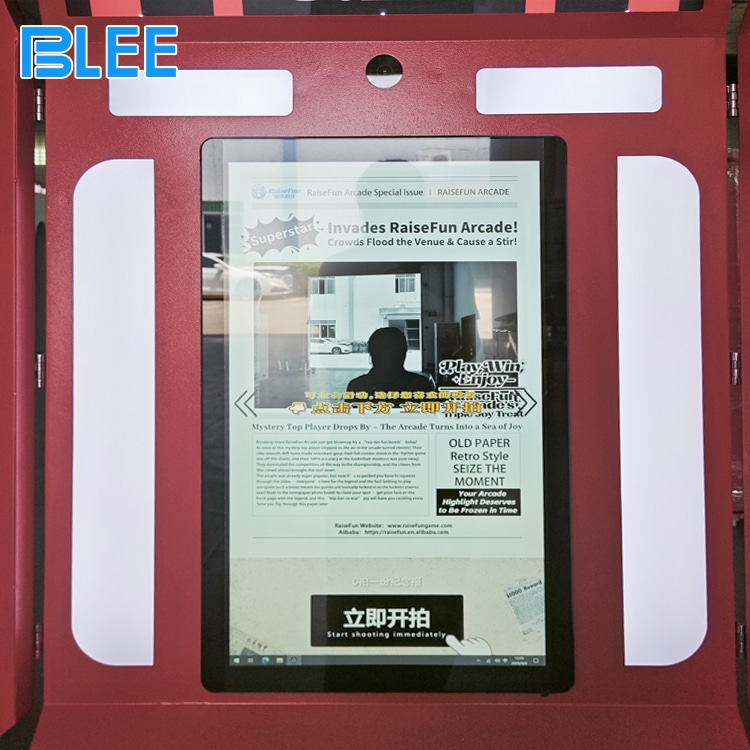
Yes. A vertical screen sits on the front of the cabinet, and the product image shows a newspaper-style page on it.
Does the machine have side panels?
Yes. Two red side panels sit near the upper front section.
Can this photo booth be used in shopping malls?
It can be considered for indoor commercial locations such as malls and entertainment centers. Check the installation conditions before purchase.
What type of newspaper does the machine print?
The exact printing format, paper size, and output specifications have not been provided, so confirm the available configuration with the supplier.
Can the booth be customized?
OEM and ODM customization is available for colours, branding, and design. You can read more here: https://www.bleearcade.com/oemodm-service/